Calendar tools for Google Calendar, Outlook and every calendar app
Early access
Meridian inside the calendar you already use.
Working hours, public holidays and clock changes for every place you meet, right where you book the meeting.
Any calendar app
City overlap calendars
The hours you and New York both work, as a calendar you subscribe to once in Google Calendar, Outlook or Apple Calendar. It stays right when the clocks change and skips public holidays.
Every working day · Tokyo time
10:30–11:30 am Tokyo
8:30–9:30 pm, day before in New York
No hour fits everyone’s hours. At the closest fit, Tokyo starts 30 minutes early, and New York stays 30 minutes late.
11 am–9 pm hours in Tokyo: change
11 am–9 pm hours in New York: change
This closest fit goes into your calendar as a block on every working day for the next six months, at your own time. It moves when the clocks change, skips public holidays and keeps you free for meetings.
Using Google Calendar on a phone? Its app can’t add a calendar from a link, so add it on a computer. Email me the link
Another calendar app? Paste this link into it
Week of November 2 in your calendar
Drawn on Tokyo’s clock. Your calendar shows each block at your own time.
- Mon Nov 2 Clocks changed: New York is 14 h behind Tokyo (was 13 h)
- Tue Nov 3 Holiday in Tokyo: Culture Day
Each block: New York 8:30 pm · closest fit
Mon 2
Tue 3
Wed 4
Thu 5
Fri 6
Just one meeting? The meeting planner finds the hour for these places, and your board sends people a link that adds it to their calendar.
Chrome extension
Google Calendar
As you set an event’s time, each place’s clock appears beside it, with a dot for whether it’s a good hour there.
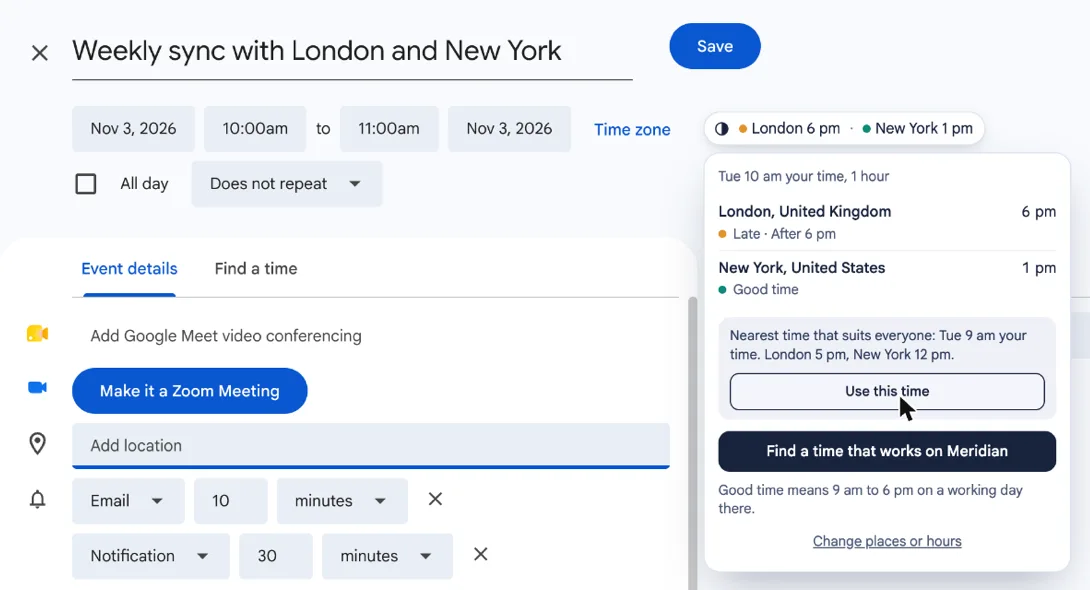
- Click for the nearest time that suits everyone, and move the meeting there in one click.
- Weekends and public holidays count, in each place.
- Say once where a guest is, and every invite with them shows their time.
Coming soon to the Chrome Web Store
Outlook add-in
Outlook
Meridian speaks up on its own in Outlook. Change the time or add a guest, and a note appears when the meeting lands out of hours for anyone, with a time that suits everyone.
Coming soon
6 pm in Berlin is after hours. 7:30 am suits everyone.
- You · San Francisco9:00 am · at work
- Sam · London5:00 pm · end of day
- Lena · Berlin6:00 pm · after hours
Questions
Will it fill up my calendar?
One block a working day, marked free, so anyone booking time with you still sees you as available. Most calendar apps let you hide it with one tick and show it again when you’re scheduling.
Why does Google Calendar show a web address as its name?
For the first minute, until it has fetched the calendar once. Then it takes the calendar’s own name, such as “New York → Berlin · Meridian”.
How often does it update?
Your calendar app fetches it again on its own: Apple Calendar and Outlook every few hours, Google Calendar about once a day. The times are worked out six months ahead, clock changes included, so nothing is missed in between.
What about clock changes?
Each day is worked out on that day’s clocks. In the weeks when one place has changed its clocks and the other hasn’t yet, the overlap moves, and the feed puts a note on the day it happens.
Which public holidays are in it?
The national public holidays of nearly every country, so a holiday on either side shows as a note instead of an overlap. Holidays only one state, region or province keeps aren’t in it, and holidays set by sighting the moon, such as Eid, are marked as possibly a day out until they’re announced.
Can I add it from my phone?
In Apple Calendar on an iPhone, yes: tap Apple Calendar. Google Calendar’s phone app can’t add a calendar from a link, so add it once from Google Calendar on a computer (the page can email you the link) and it shows up on your phone too.
Can Meridian see my calendar?
Not through the overlap calendar: your calendar app fetches it from Meridian, and nothing in your calendar is sent back. The Chrome extension reads only the event you’re editing, on the page: its start, end, time zone and guests’ addresses. It doesn’t read your other events, and guests’ addresses stay on your computer.
Does it cost anything?
Not while the calendar tools are in early access.
How do I remove it?
Delete or unsubscribe from the calendar in your calendar app, as you would any other.
Something wrong or missing here? Send feedback